
API Polling
API polling lets your agent periodically fetch data from external REST APIs. Unlike webhooks, which receive pushes from external systems, polling pulls data on a schedule — your browser makes the HTTP requests directly.
All configuration, credentials, and scheduling run entirely in the browser. The server has zero awareness that polling exists.
How It Works
Section titled “How It Works”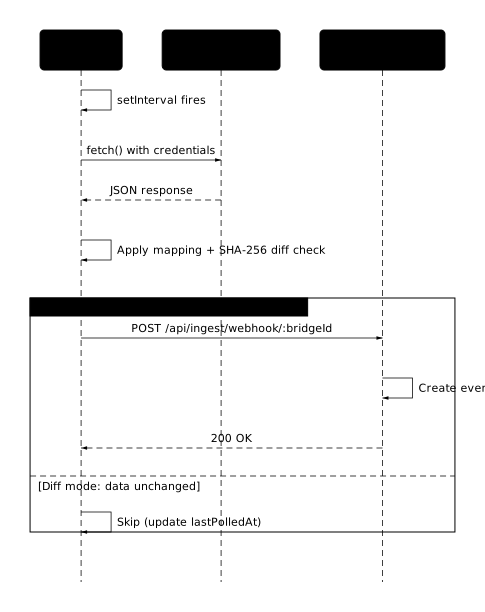
- A
setIntervaltimer fires in your browser - The browser calls the external API directly (credentials never touch the AnySoul server)
- The response is mapped to event fields (same template engine as webhooks)
- An optional SHA-256 diff check skips duplicate data
- The mapped result is sent to the server through an auto-created Bridge Webhook — reusing the existing webhook ingest endpoint with zero server-side changes
Creating a Poll Endpoint
Section titled “Creating a Poll Endpoint”- Open Agent Settings → API Poll
- Click Add
- Fill in:
- Name — a label for this poll (e.g.
tokyo-weather,btc-price) - URL — the API endpoint to call (
http://andlocalhostare OK) - Method —
GETorPOST - Authentication — see Authentication Modes
- Interval — how often to poll (1 second – 24 hours)
- JSON Path — extract a nested object from the response (e.g.
data.items) - Dedup Mode —
Full(every poll creates an event) orDiff(only when data changes)
- Name — a label for this poll (e.g.
- Click Create
New polls start in testing mode. Use Test Now to verify the response, then configure mapping before going live.
Testing Mode
Section titled “Testing Mode”When a poll is in testing mode:
- Click Test Now on the poll card
- The browser calls the external API and displays the raw response
- Open the Mapping dialog to configure how the response maps to event fields
- Review the live preview
- Click Go Live to activate — the poll timer starts and events are created on each successful poll
Testing mode lets you iterate on your configuration without creating events.
Authentication Modes
Section titled “Authentication Modes”| Mode | Header / Param | Use Case |
|---|---|---|
None | — | Public APIs, localhost services |
Bearer Token | Authorization: Bearer <token> | APIs using OAuth tokens or static bearer tokens |
API Key (Header) | Custom header (e.g. X-API-Key) | APIs requiring a key in a specific header |
API Key (Query) | Query param (e.g. ?appid=xxx) | APIs like OpenWeatherMap that use query-string keys |
All credentials are stored in IndexedDB and never leave your browser.
Visual Mapping
Section titled “Visual Mapping”The mapping dialog is identical to the webhook mapping editor:
- Left panel — JSON tree of the test response. Click a field to auto-insert the mapping expression.
- Right panel — Five target fields:
| Field | Key | Required | Example |
|---|---|---|---|
| Platform | platform | No | api-poll |
| Element | element | No | weather |
| Event Type | event_type | No | update |
| Title | title | Yes | {{ payload.weather.0.description }} — {{ payload.main.temp }}°C |
| Payload | payload | No | {{ payload.main }} |
The same template syntax applies — see Template Syntax.
Response Configuration
Section titled “Response Configuration”JSON Path
Section titled “JSON Path”Use JSON Path to extract a nested value from the API response before mapping. For example, if the response is:
{ "status": "ok", "data": { "temperature": 12.5, "humidity": 80 }}Setting JSON Path to data extracts { "temperature": 12.5, "humidity": 80 } as the mapping input.
Leave empty to use the entire response object.
Dedup Mode
Section titled “Dedup Mode”| Mode | Behavior |
|---|---|
| Full | Every successful poll creates an event |
| Diff | A SHA-256 hash of the mapped result is compared to the previous poll. An event is only created when the mapped output changes. |
Diff mode is useful for APIs that return the same data most of the time (e.g. weather, system status). Because the hash is computed on the mapped result rather than the raw response, changes in fields you don’t map (such as timestamps or request IDs) won’t trigger duplicate events.
Endpoint Lifecycle
Section titled “Endpoint Lifecycle”Status Flow
Section titled “Status Flow”| Status | Badge | Behavior |
|---|---|---|
| Testing | Amber | Test Now works; timer does not run; no events created |
| Active | Green | Timer runs on schedule; events created on each successful poll |
| Disabled | Gray | Timer stopped; no requests made |
Available transitions:
- Testing → Go Live (active) or Disable
- Active → Pause (disabled) or Test mode (testing)
- Disabled → Enable (active)
Auto-Disable on Failure
Section titled “Auto-Disable on Failure”If a poll fails 5 consecutive times, it is automatically disabled. You’ll see an error message on the poll card. Fix the issue (URL, credentials, CORS) and re-enable manually.
CORS Considerations
Section titled “CORS Considerations”Because requests originate from the browser, they are subject to CORS policies:
| Target | CORS Behavior | Status |
|---|---|---|
localhost / LAN | Usually no CORS restrictions | Works |
| Public APIs (CoinGecko, OpenWeatherMap, etc.) | Most set Access-Control-Allow-Origin: * | Usually works |
| Restricted APIs | May block browser requests | May not work |
When a Test Now request fails due to CORS, the error message will indicate this. Workarounds:
- Use a webhook instead — if the API supports webhook callbacks
- Run a CORS proxy — a lightweight local proxy that adds CORS headers
- Browser extension — extensions are not subject to CORS restrictions
Import / Export
Section titled “Import / Export”Poll configurations can be exported as JSON and imported on another device or browser.
- Export: Downloads a JSON file containing all poll configurations for the current agent. Runtime state (last polled time, errors) is stripped; credentials are included.
- Import: Reads a JSON file and creates new poll entries. Imported polls start in testing mode. Existing polls are not overwritten.
Limits
Section titled “Limits”| Limit | Value |
|---|---|
| Min poll interval | 1 second |
| Max poll interval | 86400 seconds (24 hours) |
| Max polls per agent | 10 |
| Request timeout | 10 seconds |
| Max response size (for mapping) | 50 KB |
| Max event payload size | 10 KB |
Webhook vs. API Poll
Section titled “Webhook vs. API Poll”| Webhook (Push) | API Poll (Pull) | |
|---|---|---|
| Direction | External → Server | Browser → External → Browser → Server |
| Trigger | External system sends POST | Browser timer (setInterval) |
| Runs when | Server is running (always) | Browser/Electron is open |
| Config stored | Server (D1 database) | Browser (IndexedDB) |
| Credentials | Server verifies sender | Browser sends to external API |
| localhost | Not reachable | Natively reachable |
| Cross-device | Auto-synced | Import/Export JSON |
| Mapping | Same template engine | Same template engine |
| Server changes | Webhook table + routes | None |
Related
Section titled “Related”- Webhook — push-based event ingestion
- Event Stream concept